Scorecard
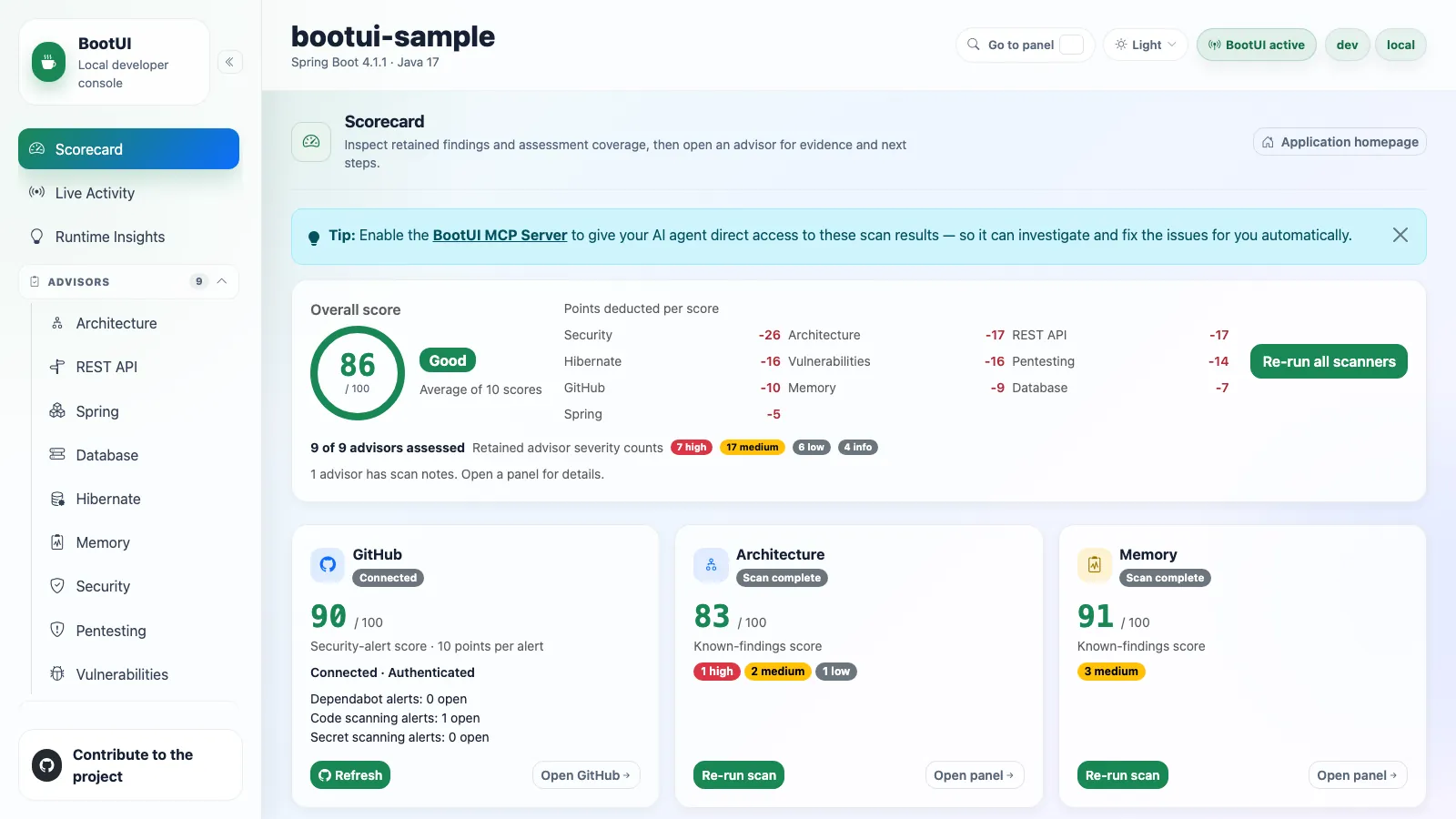
The Scorecard panel is BootUI's landing page. It opens with the standard panel header and a link to the running application's homepage, and its centrepiece is an on-demand findings and coverage summary. It lives at #/scorecard, and the former #/overview route redirects there. Its panel id stays overview, so bootui.panels.overview.enabled still controls it.
Nothing is scanned on load. The Scorecard reads the existing cached reports on first navigation and when you return from another panel, including scans started in an advisor panel or by a local agent. Those GET requests never start a scan, a probe, or an external query. Before any scan has run, the summary reports how many visible advisors have been assessed and prompts you to run them.
Run all scanners triggers every available scanner, or you can run each card on its own. After a run-all, a dismissible tip points at the MCP Server panel, since enabling it lets an AI agent read these same results and fix the findings for you.
Overall score
The overall score is the rounded arithmetic mean of the eligible, available, visible advisor scores, plus the GitHub security-alert score when that is eligible. Average of N scores names the contributing count, and the Points deducted per score grid shows each contributor's own score minus 100. Those deductions are not summed to produce the overall score.
The gauge bands are Good (80–100), Needs attention (50–79), and At risk (0–49). They describe the scored results and help prioritize review. They do not measure application safety or assessment completeness, and running one more clean scanner can raise the average without fixing a single finding. Numeric scores and retained severity labels stay visible, so meaning never depends on color alone.
With no eligible scores the summary reads Not scored and prompts an explicit scan. Unscanned, invalid, missing, and confirmed-empty assessments contribute neither 0 nor 100, and GraalVM and CRaC readiness scans never contribute at all, so running only those leaves the Scorecard Not scored rather than at zero. A genuine eligible score of zero does contribute. Usable partial reports contribute their known-findings score unchanged, with no penalty for missing checks.
Scanner cards
Each card leads with a 0–100 known-findings score for an eligible assessment, followed by its retained severity counts. The severity-based scanners are Architecture, Memory, REST API, Spring, Database, Hibernate, Security, Pentesting, and Vulnerabilities. Each starts at 100 and subtracts a fixed weighted penalty per finding, so a complete clean scan stays at 100:
| Severity | Penalty |
|---|---|
| Critical | 25 |
| High | 10 |
| Medium | 3 |
| Low | 1 |
| Info | 0 |
Limited coverage never changes those penalties, even at 100.
A card shows its scan status as a badge — Not scanned yet, Scan complete, Incomplete, Scan failed, or Scan disabled — and, next to it, how the report was assessed:
| Assessment | Meaning |
|---|---|
| A score | The report is eligible. Scan complete means the scan finished, not that it assessed every applicable check. |
| Not scored | No eligible score. Open panel shows the full reason. |
| Not applicable | Confirmed empty scope: usable: false, coverageComplete: true, and no limitations. |
A card that has never been scanned keeps its Run scan action.
Secondary diagnostics stay in each advisor's collapsed Scan notes, reachable through Open panel. The Scorecard summarizes how many advisors have scan notes instead of repeating each explanation, counting partial scans and completed scans whose coverage is incomplete or unknown. Unscanned, failed, disabled, and unavailable scanners never inflate that count, and neither does confirmed-empty scope.
What can and cannot establish a score
SCANNED and PARTIAL reports can score known findings or completed applicable evidence. Skipped, failed, vacuous, and unknown-only evidence cannot, and ERROR, DISABLED, and NOT_SCANNED never score.
A report counts as assessed when it is an accepted SCANNED or PARTIAL report with valid explicit evidence, even if that evidence cannot support a number. Confirmed-empty scope counts as assessed too. Missing legacy evidence, unscanned reports, and failed reports do not, and request failures are reported separately while preserving the last report.
Vulnerabilities can score known findings despite inventory, query, or detail gaps. UNKNOWN carries no penalty but cannot establish eligibility, even after dismissal. A clean dependency needs completed query and detail evidence and a genuinely empty retained advisory list. See score eligibility.
Dismissals remove penalties, not safety concerns or evidence gaps. No coverage percentage or application-wide completeness claim is inferred.
GitHub card
GitHub is not a severity scanner, so it is excluded from the advisor counts and severity totals. Its card shows connection and authentication state, reading Connected when connected, plus the reported Dependabot, secret-scanning, and code-scanning signals. Only available numeric counts are shown as open alerts, because an unavailable count is not a zero.
Its security-alert score subtracts 10 points per reported alert from 100, counting at most 10 alerts per signal, then clamps the result to 0–100. Three saturated signals therefore reach 0, and further alerts on one signal do not lower it again. That is an alert-count heuristic, not an assignment of HIGH severity. Eligibility requires an available, connected, authenticated report with exactly one AVAILABLE signal carrying a nonnegative safe integer count for each of Dependabot alerts, Code scanning alerts, and Secret scanning alerts, matched exactly. Confirmed zeros score 100. Missing, empty, malformed, duplicate, and unavailable signals leave GitHub Not scored, even when another signal reports known alerts, and an unscored GitHub is excluded from the overall average. The actual counts stay visible either way.
Connecting and refreshing are always user-triggered, including through Run all scanners when GitHub is the only available card. Refreshing or a failed request preserves the last accepted report and its score, while a newly received unavailable report clears that score.
Refresh behavior
Disabled and unavailable panels are excluded, and automatic reads wait for the panel manifest and use only supported, enabled advisor endpoints. Returning from a panel refreshes the cached reports with GET requests, including Vulnerabilities after a dismissal or restoration.
A busy or failed request keeps the last accepted report and adds a warning or an error. An authoritative new report replaces the old assessment, scoring usable partial evidence and excluding failed or unusable reports. A NOT_SCANNED response, such as after an application restart, replaces the old findings and returns the card to Run scan. A scan already in progress finishes before the return-navigation refresh reads its updated report.
The panel is available on every adapter. The scoring dashboard is rendered entirely in the browser: the shell reads each advisor's own reports and displays its independent score, so no backend dashboard service is involved. The shell chrome around every panel — application name, framework and version, Java version, active profiles, and active or disabled status — comes from the framework-neutral GET /bootui/api/overview endpoint every adapter exposes.
That endpoint also reports the current run in its run object: a random instanceId for this JVM's BootUI instance, and a random runId, an ordinal, and a startedAt time for the current application start. A Spring DevTools restart or a Quarkus live reload starts a new run with the next ordinal inside the same instance. The ids carry no host, user, or application data.
Buttons and links across the console
Across the console, standalone navigation and secondary actions use compact, theme-aware buttons, including setup, advisor references, request details, filters, and disclosures. Navigation remains a link: it keeps its destination and supports opening in another tab. Inline explanatory references, sidebar navigation, tabs, and interactive summary cards keep their distinct presentation. All seven styles share the same controls and keyboard behavior.