Command line
BootUI's diagnostics are reachable from a terminal. The bootui CLI works with Spring Boot and Quarkus: it asks a running application one question and prints the answer — no browser, no MCP client, no hand-written curl.
$ bootui beans --query dataSource
$ bootui hibernate scan --json | jq '.topFindings[] | select(.severity == "HIGH")'
$ bootui http exchanges --limit 20
Every diagnostic command is one BootUI MCP tool, projected mechanically from the same registry. The CLI cannot offer a diagnostic the MCP server does not, and cannot lack one it does: the command table is generated from the registry at build time and a test fails when the two disagree. tools reads the CLI catalog, and mcp status|enable|disable call the MCP Server panel directly rather than invoking catalog tools.
Install
The CLI is a single runnable jar. It needs a JDK 17 or later — the machine that builds your application already has one.
On Linux and macOS:
curl -fsSL https://www.julien-dubois.com/boot-ui/install.sh | sh
On Windows, in PowerShell:
irm https://www.julien-dubois.com/boot-ui/install.ps1 | iex
That asks Maven Central for the newest release, tries its published SHA-512, SHA-256, then SHA-1 checksum, and leaves a bootui command in ~/.local/bin — %LOCALAPPDATA%\BootUI\bin on Windows, which it adds to your user PATH. It needs no administrator rights, does not edit your shell profile, and contacts nothing but the Maven repository. Running it again upgrades in place, and --uninstall — -Uninstall in PowerShell — reverses it.
An available checksum mismatch aborts without installing. If no checksum can be fetched or calculated, the installer prints a note and continues without verification; it does not verify a GPG signature. Inspect that output before trusting the installed jar.
To pin a version or install somewhere else, pass options after sh -s --:
curl -fsSL https://www.julien-dubois.com/boot-ui/install.sh | sh -s -- --version <version> --bin-dir ~/bin
The PowerShell script takes -Version and -BinDir, but has to be run rather than piped to read them:
& ([scriptblock]::Create((irm https://www.julien-dubois.com/boot-ui/install.ps1))) -Version <version>
The shell script explains itself with --help. Both read BOOTUI_VERSION, BOOTUI_INSTALL_DIR, BOOTUI_BIN_DIR and BOOTUI_MAVEN_REPO, so a build agent behind a mirror can be pointed at its own repository.
If you would rather not pipe a script into a shell — a fair position, and both are short enough to read first — there are two other ways in.
With JBang, which downloads and runs it for you:
jbang bootui@jdubois/boot-ui --url http://localhost:8080 beans
Install it as a real command with jbang app install bootui@jdubois/boot-ui, and then just bootui beans.
Or download the jar and run it directly:
VERSION=2.1.0
BASE=https://repo1.maven.org/maven2/com/julien-dubois/bootui/bootui-cli
curl -fLO "${BASE}/${VERSION}/bootui-cli-${VERSION}-all.jar"
java -jar "bootui-cli-${VERSION}-all.jar" beans
An alias keeps that readable:
alias bootui='java -jar ~/tools/bootui-cli-all.jar'
Staying up to date
Once a newer release reaches Maven Central, the CLI says so — on a terminal, after the answer, on standard error:
bootui: version 1.17.0 is available; you have 1.16.0.
        Update with: curl -fsSL https://www.julien-dubois.com/boot-ui/install.sh | sh
        Silence this with BOOTUI_NO_UPDATE_CHECK=1.
The notice reads the cached result in ~/.bootui — %LOCALAPPDATA%\BootUI on Windows, or BOOTUI_INSTALL_DIR wherever you pointed it. That check reads the same maven-metadata.xml the installer does, at most once a day, on a background thread that the command gives at most 250 ms to finish at shutdown. A still-running refresh is abandoned when the JVM exits. An interrupted refresh may be retried by a later run; a completed attempt is normally throttled to once a day. Nothing is written to standard output and the exit code is untouched, so a pipeline sees exactly what it saw before.
A piped run says nothing and asks nothing, so CI does no unexpected network traffic. BOOTUI_NO_UPDATE_CHECK=1 turns it off everywhere, and BOOTUI_MAVEN_REPO points it at a mirror.
Turn it on
The CLI talks to GET /bootui/api/cli and POST /bootui/api/cli/tools/{name}, which are enabled by default. Nothing needs configuring for a normal local application, and bootui.mcp.enabled is not required — the command-line endpoint is separate from the MCP one.
To turn it off:
bootui.cli.enabled=false
See Properties for bootui.cli.max-results, bootui.cli.execution-timeout, and bootui.cli.max-concurrent-calls.
Global options
| Option | Environment variable | Default | Purpose |
|---|---|---|---|
--url <url> | BOOTUI_URL | http://localhost:8080 | Where the application is listening. A bare host:port is accepted. |
--api-path <path> | BOOTUI_API_PATH | /bootui/api | Only needed when bootui.api-path is customised. |
--token <token> | BOOTUI_TOKEN | none | Sent as an Authorization: Bearer <token> header. Needed for an untrusted non-loopback caller, using the configured or generated BootUI token; loopback, trusted proxies, and trusted container gateways need none. |
--timeout <seconds> | — | 60 | How long to wait for an answer. Raise it for a slow scan. |
--json | — | auto | Print the application's JSON verbatim. Implied when output is not a terminal. |
--no-color | NO_COLOR | — | Disable ANSI colour. |
-v, --verbose | — | — | Show the underlying failure when a request does not complete. |
Options work before or after the command, so both bootui --url :9000 beans and bootui beans --url :9000 do the same thing.
Output
On a terminal, BootUI renders the payload for a human: arrays of like-shaped records become tables, everything else becomes an indented key/value tree.
When output is piped, or with --json, the CLI prints exactly the bytes the application sent — the same JSON the MCP tool returns, unmodified. That is the form to parse:
bootui security scan --json | jq -r '.topFindings[] | "\(.severity)\t\(.title)"'
Every scan command answers with the same compact summary: findingsFound, severityCounts, at most ten topFindings (id, title, severity, count, most severe first), moreFindings for the rest, and reportTool, the MCP name of the report that holds the rest (get_security_report, which bootui security report prints without scanning again). Reports differ in how they name their finding array — pentest report has findings, the rule-based advisors results — so check the shape with bootui <command> --json | jq keys before filtering one. What every scan and report shares is severityCounts, which is what the CI gate below uses.
The capture controls (sql pause, tx clear, rest-client resume, exceptions clear, traces clear, ...) answer with a one-line acknowledgement — action, available, unavailableReason, capturing, retained, capacity, and totalCaptured, the entries recorded since startup, which a clear does not reset — and the matching read command (sql traces, tx list, ...) prints the rows. See Compact answers from scans and capture controls.
Search commands such as bootui config --query share a page envelope instead, where total counts everything the panel can see before the query is applied and matched counts what the query kept. A large total beside matched: 0 therefore means the query found nothing, not that the data is missing — retry with a shorter query. See Reading a bounded result for the full envelope, including the relaxed name matching that lets bootui config --query bootui.mcp.enabled find a value supplied as BOOTUI_MCP_ENABLED.
Large reads answer with a short first page when no --limit is given, such as the newest 20 statements for bootui sql traces, the newest 20 calls for bootui rest-client traces, or 25 entries for bootui activity, and page.hasMore says when rows were left out: narrow --query or raise --limit. Agent-sized defaults lists each command's default. A 1.x CLI keeps calling these commands, without the newer options, and gets the same short first page.
Auto-detection is a convenience, not a contract: on a JDK 22 or later runtime a redirected stream can still report a console. Pass --json explicitly in scripts.
Successful tool calls must contain JSON. An empty or whitespace-only response, including HTTP 204, exits 1 without printing a fabricated result; literal JSON null, objects, arrays, and evolving tool payloads remain valid. bootui tools validates the BootUI catalog in both text and JSON modes, while accepting older catalogs and unknown extra fields.
Low-footprint mode
bootui low-footprint status reads the mode without changing capture. With the user's approval, bootui low-footprint enable pauses existing BootUI recorders, clears buffered diagnostics irreversibly, and requests GC; bootui low-footprint disable releases the hold. Both are idempotent Live Memory actions under the existing disabled/read-only gates. The mode lasts until disabled or the process restarts; it does not pause the Java agent.
Affected JSON results keep their existing fields and add lowFootprint with actual paused components, timestamp, warnings, and resume guidance. Human-readable output leads with a paused notice; --json stays byte-for-byte server output. Paused or partially paused evidence is not proof of an idle application, and successful reads still exit 0. Individual recorder resumes and new probes refuse with exit 1 while held; disable first with approval. Older CLI binaries keep their existing commands, but cannot offer these new leaves without an updated manifest. See the full agent contract for partial failures and mixed native/agent evidence.
Retrieve more than the advisor preview
Architecture, Hibernate, Spring (the Quarkus application advisor on Quarkus), REST API, Memory, Security, and Database Advisor reports contain compact sampleViolations, not all violationCount details. Samples remain bounded at ten per result, or twenty for the Quarkus application and Security advisors. Page the retained details with architecture violations, hibernate violations, spring violations, rest-api violations, memory violations, security violations, or db violations:
# Read the existing snapshot; this does not start a scan.
scan_id=$(bootui architecture report --json | jq -er '.violationDetails.scanId')
bootui architecture violations ARCH-SPRING-004 --scan-id "$scan_id" --offset 0 --limit 100 --json
The rule ID is positional and --scan-id is required. --offset defaults to zero; --limit defaults to 100 and is capped at min(1000, bootui.cli.max-results). Nonblank IDs, nonnegative integer offsets, and positive integer limits are required. JSON null, fractional or overflowing numbers, and unknown arguments are rejected. These are read commands and remain available on read-only panels.
A script can visit the retained pages without starting a new scan:
offset=0
while :; do
  page=$(bootui architecture violations ARCH-SPRING-004 --scan-id "$scan_id" \
    --offset "$offset" --limit 100 --json) || break
  printf '%s\n' "$page" | jq '{violationCount, retainedCount, truncated, violations, page}'
  [ "$(printf '%s\n' "$page" | jq -r '.page.hasMore')" = true ] || break
  returned=$(printf '%s\n' "$page" | jq -r '.page.returned')
  [ "$returned" -gt 0 ] || break
  offset=$((offset + returned))
done
Architecture, REST API, and Hibernate pages also carry locations, aligned index-for-index with violations (a null entry has no location): each gives className, memberName, kind, sourceFile, line, sourcePath, and precision, so a script can open the file without parsing the text, for example with jq -r '.locations[] | select(.) | "\(.sourcePath):\(.line)"'. Reports carry the same list as sampleLocations and explain a missing path in violationDetails.locationNotes. See violation locations.
page.total and page.matched both count retained details for this rule; violationCount remains the real count. Always inspect truncated: a terminal page is not proof that all counted details were retained. Reports expose violationDetails with scanId, total, retained, retentionLimit, and truncated. The default retention budget is 10,000 sanitized details per advisor scan (bootui.advisors.max-retained-violations). Raising the budget only affects an explicitly requested new scan. Retention completeness is separate from evidence coverage; verify every finding before changing code. truncated can also indicate counted identities unavailable from upstream observations, not only retention overflow. Such gaps remain explicit in diagnostics; increasing the retention budget does not manufacture missing identities.
Only the latest completed snapshot is kept. A stale ID or no completed snapshot is HTTP 409: reread the cached … report, obtain its ID, and restart detail paging, not … scan. A rule id outside the advisor's rule catalogue answers Unknown advisor rule: ..., and a catalogue rule without findings (passed, skipped, or failed) answers Advisor rule has no findings in the current scan.; both are REST 404 and MCP in-band isError: true failures, and the CLI facade preserves its existing mapping to HTTP 400 so an unknown rule is not mistaken for an unavailable command. Both exit 1 with the application's message. A missing scan ID is rejected before a detail read. Dismissal leaves the snapshot ID and its details intact.
MCP also has a rendered-byte limit: -32003 (legacy) or -31003 (modern) means retry the same offset and scan ID with a smaller limit, not that the page was empty. The CLI's own result, timeout, and concurrency budgets still apply; do not advance the offset after any failure or silently rescan to recover. See agent pagination guidance.
Exit codes
| Code | Meaning |
|---|---|
0 | The tool ran and answered. |
1 | Usage error, a rejected argument, authentication was rejected, or the application could not be reached or did not answer. |
2 | BootUI declined to run the tool: its panel is disabled, read-only and the tool is an action, or its CLI catalog confirms the endpoint is disabled. |
3 | Reserved for a future severity threshold. |
HTTP 503 alone is not a policy refusal. The CLI checks the target's BootUI catalog and reports endpoint disablement only when enabled is false and tools is empty. An outage, an invalid catalog, or a wrong target exits 1, not the policy-skip code 2; a catalog that still reports enabled: true cannot turn an outage into a skip. Direct MCP panel commands preserve BootUI's specific panel-policy reason on HTTP 403, rather than suggesting an authentication token can bypass a disabled or read-only panel. Their existing exit codes are unchanged; actual authentication refusals keep the token/local-access guidance, and non-JSON error bodies are not printed.
A command whose tool this application does not advertise exits 1 and says why: "This application does not expose 'get_kafka_activity'." followed by the panel's own reason, such as a missing library or the Java agent, or the stacks that do offer it. It is not 2, because no panel policy refused it; nothing here can serve it.
A tool that runs and rejects what you asked for — bootui exceptions show, bootui request-profile, bootui insights show, bootui insights compare, or bootui probe show on an id that is unknown or no longer retained, say — exits 1 and prints the application's own message, which names where current ids come from. That is the same code as a usage error because it is the same kind of mistake: the command exists and BootUI was willing to run it, but the request was wrong, so retrying it unchanged cannot help.
2 is deliberately distinct. A read-only panel refusing a scan is a statement about how the target is configured, not a broken request, and a CI job should be able to tell those apart without reading stderr:
bootui hibernate scan --json > report.json
case $? in
  0) echo "scanned" ;;
  2) echo "the Hibernate panel is disabled on this application; skipping" ;;
  *) exit 1 ;;
esac
Discovering what an application exposes
bootui --help needs no running application and lists every command in one answer: its arguments, what it returns, where an <id> comes from, the words a --query understands, and one example. bootui insights --help lists one group the same way, and bootui <command> --help gives the whole description with the same example:
$ bootui --help
...
  bootui insights impact <id>
      For a route, bean, class, method (Class#method, with parameter types for
      one overload, or a bare method...
      <id>: A route, bean, class, Class#method or a bare method name,
      repository, table, cache, host, or event type.
      Example: bootui insights impact 'OrderService#total'
...
Every action, a command that changes the application's state, is tagged [action - needs approval] in the listing and in its own help, so an agent asks the user before running it. A command's own help keeps the warnings the listing shortens, such as memory scan triggering a full GC or probe start needing separate approval and recording metadata only.
Values in angle brackets in an example, such as <id> or <scanId>, come from the command the <id> line names; every other value is typed as shown. A command without arguments is shown as it runs, and one that only some stacks offer says which. The examples are generated with the command table and a test runs each one, so they cannot drift from the commands. bootui tools and the Command Line panel do not show them.
The command table below is what this CLI was built with. What a specific application answers depends on its stack and its panel settings, and bootui tools reports that:
$ bootui tools
command                tool                   panel        arguments      status
---------------------  ---------------------  -----------  -------------  --------------
beans                  get_beans              beans        query, limit   ready
sql clear              clear_sql_traces       sql-trace    -              read-only
sql traces             get_sql_traces         sql-trace    query, limit   ready
status is ready for a readable tool, action for one that changes state, read-only when the panel would refuse the action, and panel disabled when the panel is off. This is also how to see stack differences: a Quarkus application advertises fewer tools than Spring MVC, and some Spring tools appear only when the corresponding library is on the classpath.
Java agent sensor switches
bootui agent status --json accepts --query, not --limit, and lists every matching sensor. The task and thread snapshot registries each retain at most 32,768 application entries across all claim generations, plus 64 reserved self-test markers. Inspect overflow and neverApplied: both are cumulative until the JVM exits, even after disabling the threads sensor. Once executor overflow has occurred, a reused task object can have run with a later submitter's request context; the Java Agent panel and the MCP/generated CLI help warn about this limit. Do not interpret affected propagation as proof of exact ownership.
With the user's approval, bootui agent sensor enable <id> and bootui agent sensor disable <id> apply the same bounded runtime switch as enable_agent_sensor and disable_agent_sensor in MCP, on Spring MVC, Spring WebFlux, and Quarkus. Accepted ids are threads, files, environment, thread-activity, thread-locals, and security-sinks. Read bootui agent status and bootui side-effects first, explain the sensor's collection and performance trade-offs, and obtain approval before switching. Read status again to verify the result.
The agent must be attached, armed for this application, and support runtime switches. The Java Agent panel's enabled and read-only policy applies. Invalid ids and switch refusals retain the panel's error message; panel policy refusals exit 2, while invalid ids and unavailable-agent refusals exit 1. Overrides last through later claims in this JVM, including DevTools restarts and Quarkus live reloads, but are not written to a file and disappear when the JVM exits. Enabling security-sinks cannot enable request-value matching unless bootui.agent.security-sinks.request-values=true was set at startup. See Switching sensors at run time for the privacy, overhead, and comparison limits.
MySQL reads
The MySQL command pair is the projection of get_mysql_report and mysql_read, not a SQL console. It supports MVC, WebFlux with JDBC, and Quarkus with JDBC. Oracle MySQL 8.4 LTS and 9.7 LTS are the tested server lines, with live coverage on 8.4.6 and 9.7.2. MariaDB reached through MySQL Connector/J is read but unsupported (serverFlavorMARIADB); R2DBC-only and reactive-client-only configurations are not supported. Check bootui tools first: availability depends on the application's version, datasource, and panel policy.
bootui db mysql report --json
report reads only the latest sanitized cache. It never connects to MySQL. When a fresh observation is explicitly requested or approved:
bootui db mysql read --json
read is an action despite its name. It collects through the application's existing datasources; neither command accepts SQL, schema, endpoint, or pagination arguments. Global or MySQL panel read-only policy blocks collection but permits cached reports. Standard exit codes and transport limits apply; increasing --timeout changes the client's wait, not MySQL collection or pool-acquisition bounds.
Exit 0 means a report was returned, not complete coverage or a healthy database. Inspect its status, section reasons, timestamps, and limitations. Row-cap truncation, server digest overflow, missing permissions/instrumentation, and timeouts are different limitations. Missing replication evidence is not an empty successful channel list. Preserve exact decimal-string counters, byte sizes, and numeric IDs; null means unknown. Scope can be server-wide or default-schema-associated, not application-only. There are no scores or advisor recommendations. Exposure-policy changes invalidate the cache without SQL; request approval for another read rather than silently refreshing an explained NOT_READ. See MySQL.
Investigating one request
bootui activity lists what happened; bootui request-profile opens one request or execution. Pick a profileable REQUEST, SCHEDULED, or consumed MESSAGING entry (or a Runtime Insights exemplar) and pass its id:
bootui activity --limit 50 --json \
  | jq -r '.entries[] | select(.type == "REQUEST" and .profileable) | "\(.id) \(.severity) \(.summary)"'
bootui request-profile <id> --json
bootui exceptions show <exceptionGroupId> --json
The result is a selection: source: "journal" has a journal timeline and touched resources, including scheduled and message executions; source: "buffers" has the legacy HTTP-exchange buffers profile, with N+1 groups, call sites, and exception exceptionGroupId values for bootui exceptions show. When both are retained for an HTTP request, source is journal and both fields are populated; read buffers for the richer HTTP details. The journal is consulted first, then the buffer. Both respect panel visibility and exposure policy. An id neither retains exits 1 with a message naming both windows, like any other unknown id. source: "none" with available: false and an unavailableReason (exit 0) remains for what another id cannot fix: the runtime journal is off, the id's panel hides it, or the request carried nothing to correlate.
The command is request-profile, at the top level, because bootui activity is itself a command and a command path cannot also be the parent of another. It is unavailable, and exits 2, when the Live Activity panel is disabled. See Investigate one request for the same workflow over MCP.
The MCP server
The MCP server is a panel like any other, so the CLI can inspect and toggle it — subject to that panel's own enable and read-only settings:
bootui mcp status
bootui mcp enable
bootui mcp disable
These commands require a recognizable BootUI MCP status report with a typed enabled value, not an empty or generic JSON success. Missing, malformed, or unrecognized replies exit 1 without printing a successful result; an unconfirmed toggle reports an unknown outcome and is never retried automatically. This validation is specific to the MCP commands, not the dependency-free client's general support for bodyless panel actions.
The Command Line panel
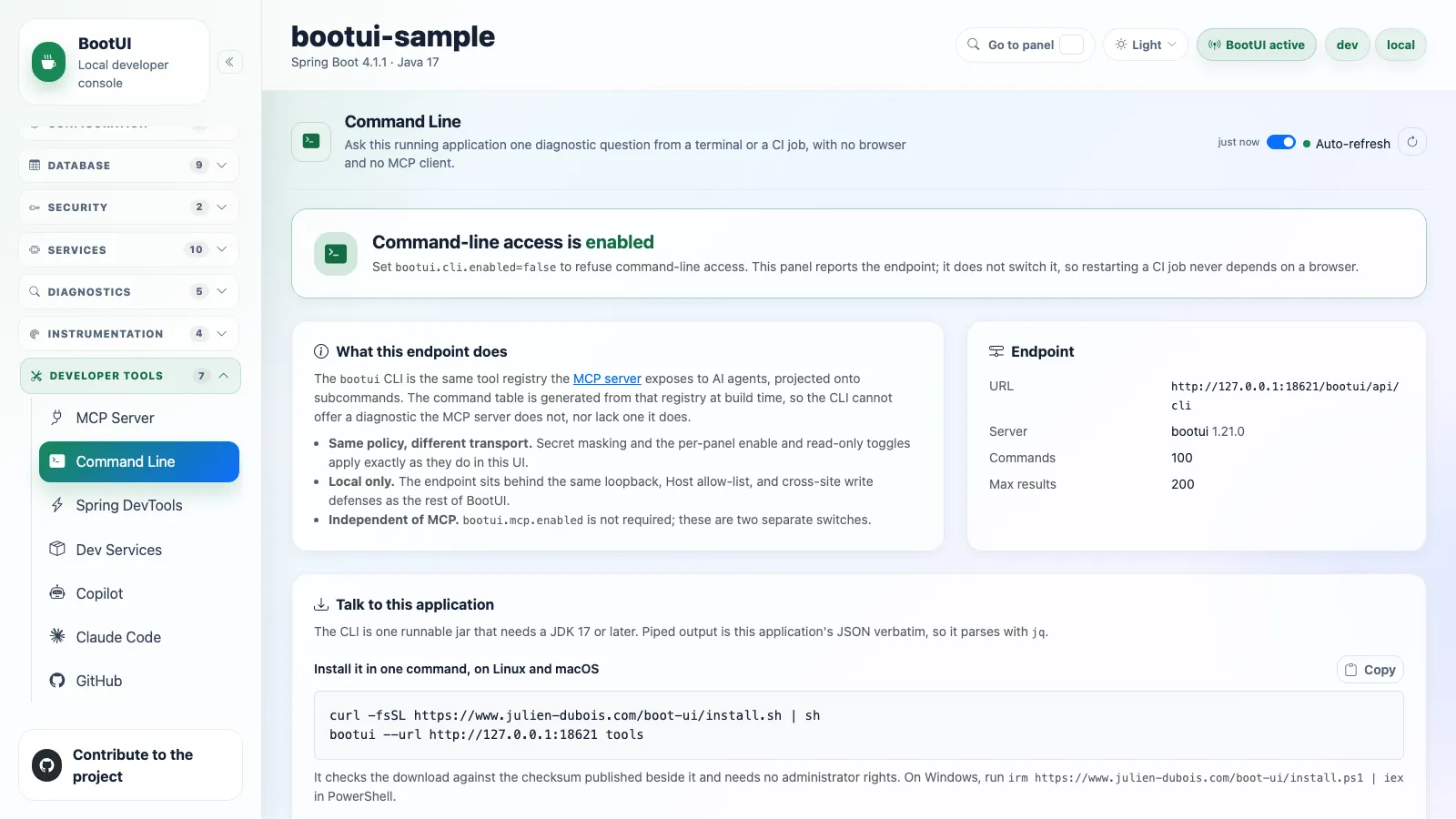
The browser console mirrors this endpoint back at you. Developer tools → Command Line shows whether the endpoint answers, the install snippet, how many calls it has served and how long they took, and every command this instance exposes — the bootui command to type, the arguments it accepts, the MCP tool it maps to, and which commands the target's panel settings would currently refuse. It is a read-only view: the endpoint is governed by bootui.cli.enabled in configuration, not by a button, because a CI job's access should not be revocable from a browser tab. See Developer tools.
In CI
The CLI is designed for a job that starts the application, asks it something, and stops it:
- name: Fail on high-severity Hibernate findings
  run: |
    ./mvnw -B spring-boot:start

    status=0
    bootui hibernate scan --json > hibernate.json || status=$?

    # Stop the application whether or not the scan answered, so a failure never leaks a JVM.
    ./mvnw -B spring-boot:stop

    case $status in
      0) ;;
      2) echo "the Hibernate panel is off or read-only on this application; skipping"; exit 0 ;;
      *) exit 1 ;;
    esac

    jq -e '[.severityCounts[]
           | select(.severity == "CRITICAL" or .severity == "HIGH")
           | .count] | add == 0' hibernate.json
Three details make that work as a gate rather than as a job that merely looks green.
Gate on severityCounts, not on a finding array. Every scan command reports severityCounts as [{"severity": …, "count": …}], so one expression works for all of them. A scan's topFindings lists at most ten findings, and the report commands do not name their array uniformly — pentest report calls it findings, the rule-based advisors call it results — so a filter written against the wrong name does not report zero findings, it aborts with Cannot iterate over null and fails the build for a reason that has nothing to do with the application.
Capture the exit code instead of letting it abort the step. A step runs under bash -e, so a bare bootui … that exits non-zero skips the rest of the script, including the shutdown. The || status=$? form keeps the failure from aborting the step so the application still gets stopped.
Treat 2 as a skip. A read-only or disabled panel exits 2 with nothing on stdout. That is a statement about how the target is configured, not a finding and not a failure — see Exit codes.
Two things make this safe rather than a new exposure. BootUI is still local-only: the endpoint stays behind the loopback, Host allow-list, cross-site-write, and authentication-token protections that guard every other route — so the application has to be running on the same runner as the job, not in a deployed environment. And no tool becomes reachable that was not already reachable — the CLI is a second spelling of the same panel data, gated by the same per-panel policy and the same bootui.expose-values rule. bootui logs tail, for example, prints log messages with secret-like assignments and authorization credentials masked by default, and without messages under METADATA_ONLY.
Every command
bootui insights compare respects source-panel policy and names disabled or unavailable evidence in limitations. Read these before treating an empty comparison as unchanged behavior. When HTTP Exchanges is hidden, every run reference retains requests: 0 for JSON compatibility; the named limitation means that count is hidden, not zero traffic. Each broker's panel gates its messaging executions and edges independently.
MCP tool names are listed so a mapping between an agent conversation and a shell script stays obvious. all means every stack advertises the tool; anything else names the stacks that do. Whether an application really exposes a tool is still what bootui tools says.
| Command | MCP tool | Arguments | Kind | Stacks |
|---|---|---|---|---|
bootui activity | get_live_activity | --query, --limit | read | all |
bootui agent status | get_agent_status | --query | read | all |
bootui agent sensor disable | disable_agent_sensor | <id> (switchable sensor); needs approval | action | all |
bootui agent sensor enable | enable_agent_sensor | <id> (switchable sensor); needs approval | action | all |
bootui ai overview | get_ai_overview | — | read | all |
bootui architecture report | get_architecture_report | — | read | all |
bootui architecture violations | get_architecture_rule_violations | <id> --scan-id <scanId> [--offset N] [--limit N] | read | all |
bootui architecture scan | architecture_scan | — | action | all |
bootui code inventory | get_code_inventory | [--query Q] [--limit N] | read | all |
bootui code paths | get_code_paths | [--query Q] [--limit N] | read | all |
bootui side-effects | get_side_effects | [--query Q] [--limit N] | read | all |
bootui beans | get_beans | --query, --limit | read | all |
bootui cache | get_cache_stats | — | read | all |
bootui conditions | get_conditions | --query, --limit | read | Spring MVC, WebFlux |
bootui config | get_config | --query, --limit | read | all |
bootui crac report | get_crac_report | — | read | Spring MVC, WebFlux |
bootui crac scan | crac_scan | — | action | Spring MVC, WebFlux |
bootui db flyway | get_flyway_migrations | — | read | all |
bootui db liquibase | get_liquibase_changesets | — | read | all |
bootui db mysql read | mysql_read | — | action | all with MySQL JDBC |
bootui db mysql report | get_mysql_report | — | read | all with MySQL JDBC |
bootui db pools | get_database_connection_pools | — | read | all |
bootui db postgres read | postgresql_read | — | action | all |
bootui db postgres report | get_postgresql_report | — | read | all |
bootui db report | get_database_advisor_report | — | read | all |
bootui db violations | get_database_advisor_rule_violations | <id> --scan-id <scanId> [--offset N] [--limit N] | read | all |
bootui db scan | database_advisor_scan | — | action | all |
bootui dev-services | get_dev_services | — | read | all |
bootui devtools livereload | trigger_devtools_livereload | — | action | Spring MVC, WebFlux |
bootui devtools status | get_devtools_status | — | read | Spring MVC, WebFlux |
bootui exceptions clear | clear_exceptions | — | action | all |
bootui exceptions list | get_exceptions | — | read | all |
bootui exceptions show | get_exception_detail | <id> | read | all |
bootui fault-tolerance | get_fault_tolerance | — | read | all |
bootui github | get_github_dashboard | — | read | all |
bootui graalvm report | get_graalvm_report | — | read | Spring MVC, WebFlux |
bootui graalvm scan | graalvm_scan | — | action | Spring MVC, WebFlux |
bootui health | get_health | — | read | all |
bootui hibernate report | get_hibernate_report | — | read | all |
bootui hibernate violations | get_hibernate_rule_violations | <id> --scan-id <scanId> [--offset N] [--limit N] | read | all |
bootui hibernate scan | hibernate_scan | — | action | all |
bootui hibernate statistics | get_hibernate_statistics | — | read | all |
bootui http exchanges | get_http_exchanges | --limit | read | all |
bootui http routes | get_http_routes | --limit | read | all |
bootui http sessions | get_http_sessions | — | read | Spring MVC |
bootui insights compare | get_runtime_run_comparison | [<id>] (defaults to previous, or a run id) | read | all |
bootui insights impact | get_runtime_impact | <id> | read | all |
bootui insights list | get_runtime_insights | --query (all adds the rows the default list leaves out), --limit | read | all |
bootui insights show | get_runtime_insight | <id> | read | all |
bootui jms | get_jms_activity | — | read | Spring MVC, WebFlux |
bootui jvm tuning | get_jvm_tuning | — | read | all |
bootui kafka | get_kafka_activity | — | read | all |
bootui loggers | get_loggers | --query, --limit | read | all |
bootui logs tail | get_log_tail | --query, --limit | read | all |
bootui low-footprint disable | disable_low_footprint | — | action | all |
bootui low-footprint enable | enable_low_footprint | — | action | all |
bootui low-footprint status | get_low_footprint | — | read | all |
bootui mail | get_emails | — | read | all |
bootui mappings | get_mappings | --query, --limit | read | all |
bootui memory heap analyze | analyze_heap_dump | — | action | all |
bootui memory heap report | get_heap_dump_report | — | read | all |
bootui memory live | get_live_memory | — | read | all |
bootui memory report | get_memory_report | — | read | all |
bootui memory violations | get_memory_rule_violations | <id> --scan-id <scanId> [--offset N] [--limit N] | read | all |
bootui memory scan | memory_scan | — | action | all |
bootui metrics | get_metrics | --query, --limit | read | all |
bootui overview | get_overview | — | read | all |
bootui pentest report | get_pentest_report | — | read | all |
bootui pentest scan | pentest_scan | — | action | all |
bootui probe show | get_method_probe | <id> | read | all |
bootui probe start | start_method_probe | <id> (the method, binary.Class#name); ask the user for separate approval first | action | all |
bootui profile diff | get_profile_diff | — | read | all |
bootui rabbitmq | get_rabbitmq_activity | — | read | all |
bootui repositories | get_spring_data_repositories | — | read | Spring MVC, WebFlux |
bootui request-profile | get_request_profile | <id> | read | all |
bootui rest-api report | get_rest_api_report | — | read | all |
bootui rest-api violations | get_rest_api_rule_violations | <id> --scan-id <scanId> [--offset N] [--limit N] | read | all |
bootui rest-api scan | rest_api_scan | — | action | all |
bootui rest-client clear | clear_rest_client_traces | — | action | all |
bootui rest-client pause | pause_rest_client_recording | — | action | all |
bootui rest-client resume | resume_rest_client_recording | — | action | all |
bootui rest-client traces | get_rest_client_traces | --query, --limit | read | all |
bootui scheduled | get_scheduled_tasks | — | read | all |
bootui security config | get_spring_security | — | read | Spring MVC, WebFlux |
bootui security logs | get_security_logs | --limit | read | all |
bootui security report | get_security_report | — | read | all |
bootui security violations | get_security_rule_violations | <id> --scan-id <scanId> [--offset N] [--limit N] | read | all |
bootui security scan | security_scan | — | action | all |
bootui sessions claude | get_claude_code_sessions | --query, --limit | read | all |
bootui sessions copilot | get_copilot_sessions | --query, --limit | read | all |
bootui spring report | get_spring_report | — | read | all |
bootui spring violations | get_spring_rule_violations | <id> --scan-id <scanId> [--offset N] [--limit N] | read | all |
bootui spring scan | spring_scan | — | action | all |
bootui sql clear | clear_sql_traces | — | action | all |
bootui sql pause | pause_sql_trace_recording | — | action | all |
bootui sql resume | resume_sql_trace_recording | — | action | all |
bootui sql traces | get_sql_traces | --query, --limit | read | all |
bootui startup | get_startup_timeline | --query, --limit | read | Spring MVC, WebFlux |
bootui threads | get_threads | --query, --limit | read | all |
bootui traces clear | clear_traces | — | action | all |
bootui traces list | get_traces | --limit | read | all |
bootui tx clear | clear_transactions | — | action | Spring MVC, WebFlux |
bootui tx list | get_transactions | — | read | Spring MVC, WebFlux |
bootui tx pause | pause_transaction_recording | — | action | Spring MVC, WebFlux |
bootui tx resume | resume_transaction_recording | — | action | Spring MVC, WebFlux |
bootui vulnerabilities report | get_vulnerabilities_report | --query, --limit | read | all |
bootui vulnerabilities scan | vulnerabilities_scan | — | action | all |
bootui websockets | get_websockets | — | read | all |
Building on it
The transport is the io.github.jdubois.bootui.client package of bootui-cli, a small client with no dependencies at all — no Jackson, no picocli, no HTTP client beyond the JDK's — that handles the URL, the token, the request, and the outcome mapping. It treats payloads as opaque JSON on purpose, so a client built against one BootUI version keeps working against an application running another. That is what a future Maven plugin, or your own tooling, would build on.
Depend on com.julien-dubois.bootui:bootui-cli for it: picocli is an optional dependency, so the client brings nothing onto your classpath. That plain jar is a library, not a runnable CLI; to run the CLI, use the shaded bootui-cli-<version>-all.jar described above. Before BootUI 2.0, the client was its own bootui-client artifact.