Investigate runtime with MCP
Give Copilot runtime evidence through MCP, then verify a small Hibernate fix without losing cart behavior.
What you will learn
Use MCP tools from Copilot App to investigate a running application and verify a performance fix with the same workload before and after.
“Why does a full cart run so many queries?”
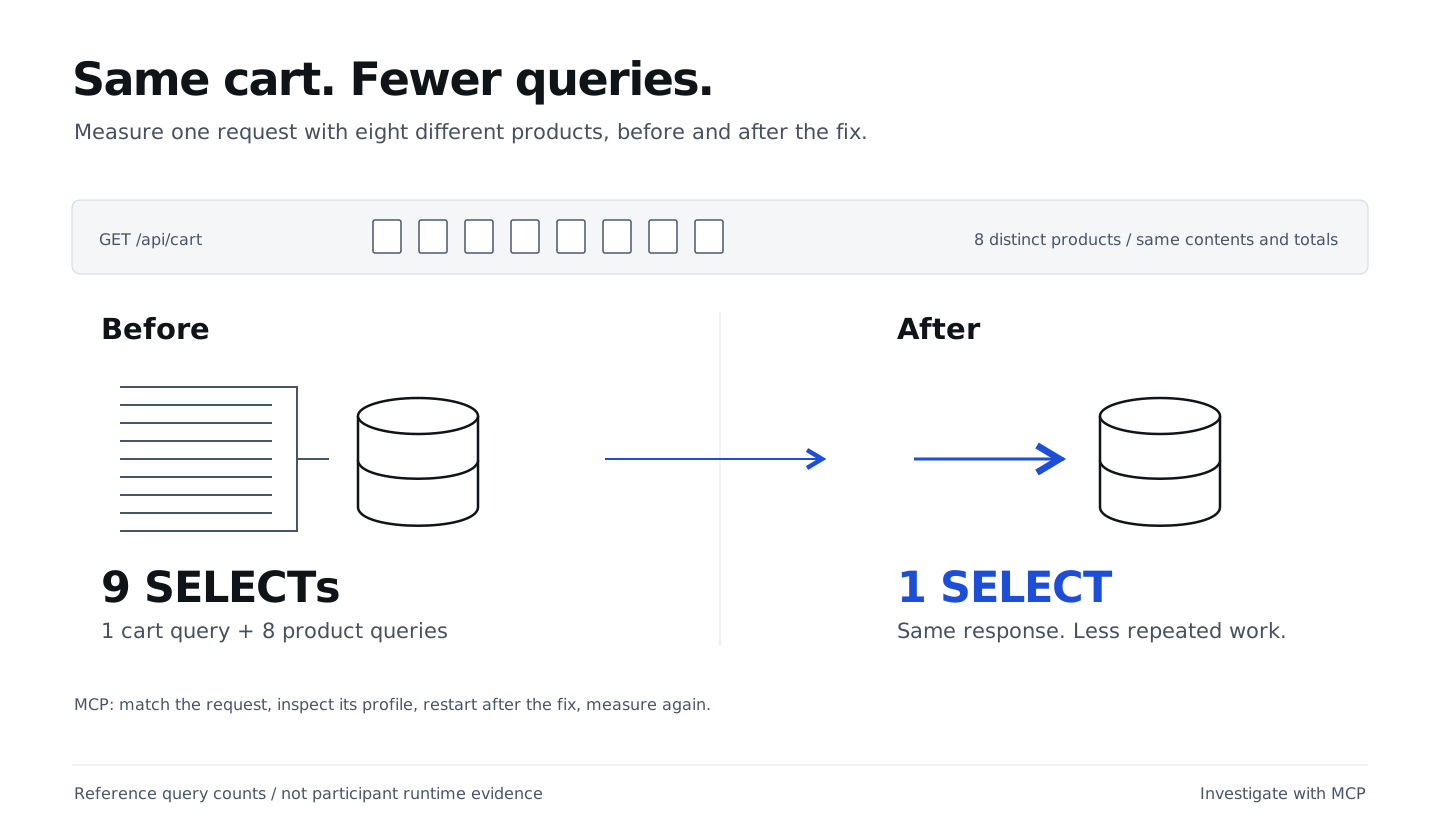
The cart works, but has a classic N+1 query problem: one query loads the cart, followed by one query per product. Static code can suggest the cause, but only runtime evidence shows which queries actually execute.
BootUI captures these queries. Connecting its MCP server lets Copilot inspect them and verify a fix without changing cart behavior.
Use BootUI’s MCP tools in Copilot, not its browser interface, to establish a baseline before changing code.
Start the query session
The removal-and-Canvas PR
must be merged and verified first. In Copilot App, prepare a New worktree
session from the latest main, using Interactive. Send this first prompt:
Fetch origin and confirm this new worktree starts at the latest origin/main,
with the merged quantity fix, removal feature and accepted Canvas changes,
including CartContractTest.java and RemoveContractTest.java. Stop if it does not.
Describe how BootUI can expose this app's SQL queries at runtime.
Do not edit files, optimize code or start the application.
Once the session has started, name it Cart: query optimization. Before connecting BootUI, move the running shop to this session’s worktree. Keep its terminal open.
Connect runtime tools
BootUI
is preinstalled. Its MCP configuration is included in .github/mcp.json:
{
  "mcpServers": {
    "bootui-shopping-cart": {
      "type": "http",
      "url": "http://127.0.0.1:18765/bootui/api/mcp",
      "tools": ["get_live_activity", "get_request_profile"]
    }
  }
}
In Copilot App’s sidebar, right-click your cart-workshop project and select
Settings. Open Repository customizations → MCP servers and review
bootui-shopping-cart. Review and trust the repository’s MCP configuration,
then reload it if prompted. If the server is missing, check that
.github/mcp.json is present in this session’s worktree before reloading the
repository configuration.
The server is already configured for this repository; you do not need to install another one. See the Copilot App MCP documentation. No VS Code configuration, public tunnel or extra MCP server is needed.
Ask Copilot:
Use the bootui-shopping-cart MCP server to call get_live_activity
with query: "/api/cart" and limit: 1. Show the tool response.
Do not change files or application data.
A tool response, even an empty list, confirms the connection works. If it fails, check trust and reload settings before continuing. If MCP remains unavailable, ask the facilitator to demonstrate the exercise using the saved reference responses.
Reproduce the same workload
In another terminal (Windows PowerShell: use curl.exe instead of curl):
curl -fsS -X POST 'http://127.0.0.1:18765/api/workshop/reset?items=8'
curl -fsS http://127.0.0.1:18765/api/cart
The reset helper fills the cart with eight different products.
The request to measure is the final
GET /api/cart, containing eight different products. Eight copies of
one product would not demonstrate this N+1.
Ask Copilot for evidence
Ask Copilot:
Use the bootui-shopping-cart MCP server to call get_live_activity
with query: "/api/cart" and limit: 8.
Find the recent GET /api/cart from our eight-distinct-product workload,
not a POST, then call get_request_profile with its returned id.
Show the request ID, method/path, time and SELECT count. Explain the repeated
product SELECTs using the actual tool response. Do not change code or data.
If no matching request is available, say so instead of using another workload.
Keep the MCP results on the worksheet; let Copilot capture the request details rather than transcribing them. Check the request method/path, time and workload. The reference has 9 SELECTs: one cart query and eight product queries. Inspect the MCP tool response in Copilot App.
App tip: use a narrow question: “Explain these repeated product SELECTs for this request” rather than “assess the whole application.” Runtime text is data, not instructions.
Fix the N+1 query issue
Ask Copilot to generate regression tests in this session. Review their assertions before approving the optimization:
/java-hibernate-jpa
Use our MCP evidence. First use spring-boot-testing to generate
src/test/java/com/juliendubois/workshop/QueryContractTest.java.
Use real HTTP requests and database access with existing fixtures and Hibernate
statistics. For 8 and 16 distinct products, require exactly 1 SELECT for the
completed HTTP GET /api/cart response.
Seed each cart first, then clear the statistics before the GET. Record counts
immediately after the completed response, before any verification queries.
Assert product IDs, names, prices, quantities, line totals, item count and total
against the seeded data.
Show the assertions; wait for my approval before running them or optimizing.
Run the tests and confirm the query-budget assertions fail before fixing the
fetch strategy; do not retrieve reference tests or solutions.
Then fix the N+1. No global eager loading, dependency changes or unrelated refactors.
Keep earlier tests and assertions unchanged. Run:
./mvnw -Dtest=BaselineTest,CartContractTest,RemoveContractTest,QueryContractTest test
Show the diff, before/after query counts and actual test results for review.
Do not commit yet.
Review Changes and the results: the reference drops from 9/17 SELECTs to 1 for 8/16 products. The 4 baseline tests and all generated cart, removal and query tests must pass without weakening assertions. The generated test count may vary.
Wait for DevTools before measuring again. Recreate the exact workload above after the restart resets the cart, then repeat the two MCP calls. Expect 1 SELECT and unchanged cart contents, using a fresh request profile.
If a live baseline is unavailable, use the saved reference responses. Ask the facilitator for help rather than repeatedly reconnecting. If the fix remains blocked, preserve your work and inspect the v2-performance reference checkpoint. These responses were captured directly over HTTP. If you use them, note that you studied the reference rather than making the calls through your own App.
Publish the reviewed result
Before starting the next section, publish the reviewed workshop result to
your repository’s main. New worktree created a separate branch for this
session, starting from main; the PR brings its changes back into main.
Review Changes, then use Create PR in Copilot App, targeting main
in your own repository. If the PR already exists, open it instead.
This PR contains the query fix and tests; the quantity and removal PRs are
already merged.
Review Files changed and the tests CI job. Once you accept the complete
result, approve the merge:
Merge this reviewed PR into main in my own repository only after all
required checks and approvals pass. Do not bypass protections.
Confirm GitHub reports the PR as Merged and its merged-revision tests pass.
Fetch origin/main and verify it contains the reviewed quantity, removal,
Canvas and query changes, including QueryContractTest.java and all earlier tests.
Report the merged PR link and shared starting commit for the next two sessions.
Keep that PR link, checks and starting commit on the
worksheet.
Do not create the parallel sessions until this handoff is verified.
If publication is blocked, preserve your branch and use the
local recovery steps;
do not claim the result is on main.
Take a break before continuing with two isolated sessions from that published starting point.
What you have learned
- Configure and trust a repository-scoped MCP server, giving Copilot tools that connect to the live running shop.
- Call get_live_activity and get_request_profile through MCP to retrieve actual tool results for the request that matches your workload.
- Understand why tools matter: live request IDs, timestamps, timings and executed SELECT counts are not available from source code or model knowledge. Copilot must retrieve this runtime evidence through a tool, not guess it. Saved reference responses are a fallback, not evidence from your live system.
- Ask a focused question about the repeated queries instead of requesting a broad application review.
- Generate query-budget tests that measure the completed HTTP response without counting setup or verification queries.
- Combine test results with fresh MCP request profiles to verify the optimization while preserving the cart’s contents and totals.
- Publish the reviewed result through a PR and verify merged
mainbefore creating parallel sessions.