Work in two isolated sessions
Create two App sessions from a shared reviewed base, then reconcile their changes with Agent Merge.
What you will learn
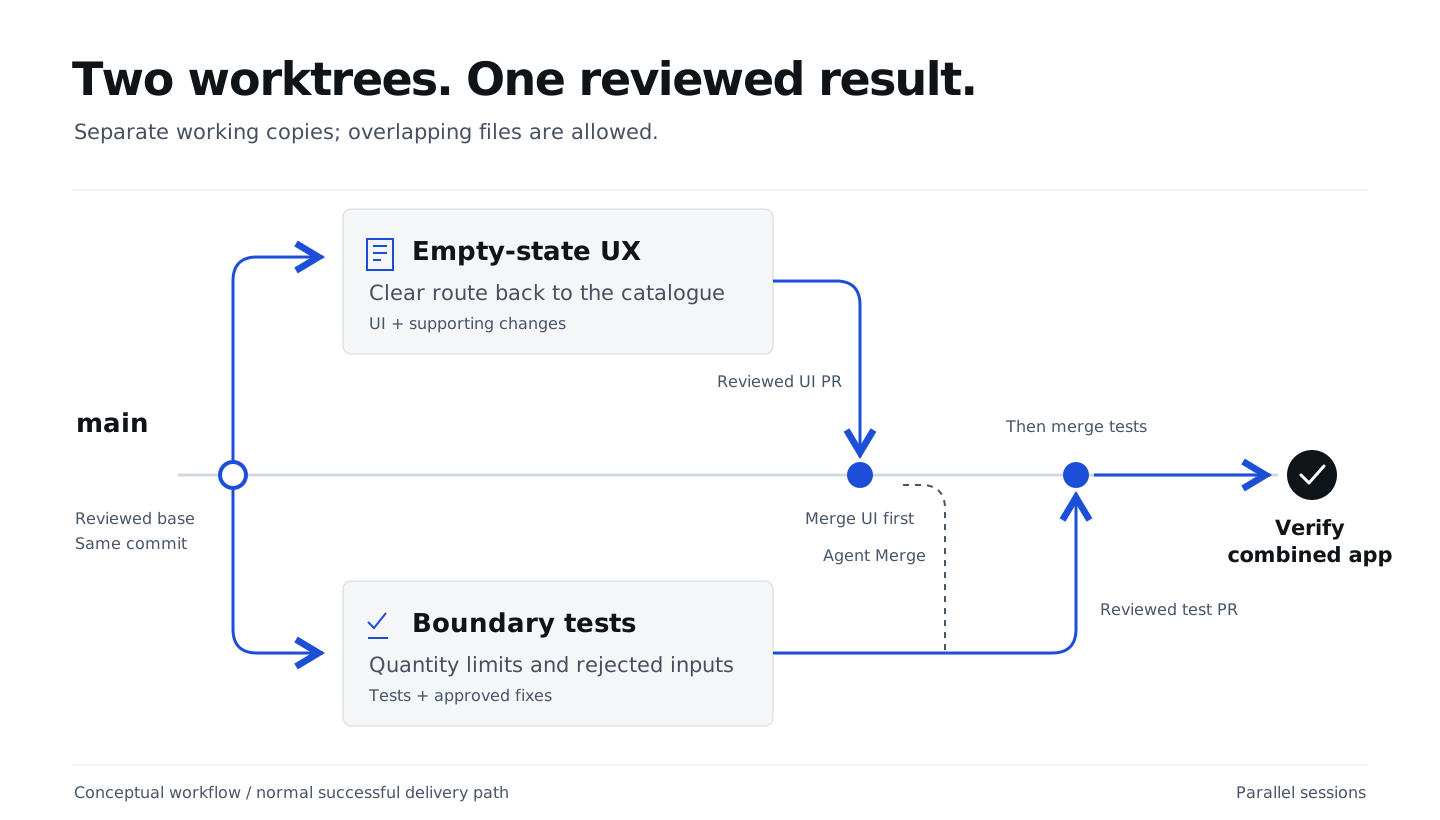
Create two Copilot App sessions in separate worktrees, starting from the same reviewed version. Their tasks may touch the same files.
Create two sessions from main
The quantity, removal-and-Canvas and MCP PRs must be merged before continuing.
Use the updated main verified at the end of the
MCP chapter.
In this exercise, you will create two project sessions with isolated worktrees
in the Copilot App UI. You will choose New worktree for each and select
main as the base branch for both. You will send the corresponding task prompt
below to start each session, then rename it once the conversation has started.
Both sessions will start from that same published version. Each session will work
in its own worktree on a separate branch, leaving main unchanged until its PR
is merged.
| Session | Task | Done means |
|---|---|---|
| Cart: empty-state UX | Improve the empty-cart experience | Empty cart includes a clear link back to the catalogue, accessible by keyboard and usable on mobile |
| Cart: boundary tests | Test quantity boundaries and review any exposed bugs | HTTP tests cover missing quantity, fractional 1.5, string "one" and exactly 99 units; rejected input preserves the cart |
Both sessions may edit the same files: each worktree has its own working copy. Overlapping changes can conflict when merged. Agent Merge can help resolve those conflicts; you still review the resolution and test the combined result. Each prompt belongs in only one session. Both prompts are below; you do not need to open another page.
Cart: empty-state UX
Prepare the first new session with the settings above. Send this prompt to start it:
Improve the empty-cart state with a clear keyboard-accessible link to the
catalogue; preserve cart behavior and mobile usability.
Keep changes focused on this interaction and preserve earlier tests.
No API changes or dependencies. Preview the UI, review the diff, commit,
and report the actual branch/commit, checks and limitations.
Do not open or merge a PR yet.
Once the session has started, rename it Cart: empty-state UX. Leave it working while you create the second session.
Cart: boundary tests
Prepare the second new session with its own New worktree, also based on
main. Send this prompt to start it:
Use spring-boot-testing to add CartBoundaryTest.java and reuse existing fixtures.
Use HTTP integration tests for missing quantity, non-integer quantity
(numeric 1.5 and string "one") and exactly 99 units.
For rejected input, require HTTP 400, then verify GET /api/cart and persisted
state are unchanged.
Preserve earlier tests and reviewed behavior.
If a test exposes a bug, keep the failing test and propose the smallest fix.
Wait for my approval before changing application behavior.
Do not weaken an assertion to make the test pass.
Run the new cases and full suite. Commit only reviewed changes and report the
actual branch/commit, executed counts, any failures and limitations.
Do not open or merge a PR yet.
Once the session has started, rename it Cart: boundary tests.
The testing skill helps this second session write and run the HTTP tests. If those tests reveal a bug, review the proposed correction before proceeding.
If a boundary test exposes an application bug
Keep the failing regression in Cart: boundary tests. Review the exact request, expected behavior and proposed fix, then approve the smallest correction in that same session. Preserve earlier tests and rerun the full suite. Do not weaken assertions or proceed while the regression still fails. Include the reviewed correction in this session’s handoff and PR.
Supervise without sharing a working directory
App tip: review each session’s changes against its task, not a list of exclusively owned files. Separate worktrees do not guarantee conflict-free merges.
Have both sessions follow the shared formatting commands before handing off changes. Keep the formatter version and profile unchanged so style-only edits do not obscure either task.
Check progress and clarify the task when needed. Give each session time to work instead of repeatedly asking for updates or starting more agents. Each worker reviews and commits its changes, then reports its branch, commit and test results.
For the UI preview, move the running shop to Cart: empty-state UX, then have Copilot reload the existing Browser canvas. Tests use random ports and isolated H2; Cart: boundary tests does not need another persistent shop. Do not reuse preview evidence from a different branch. The MCP investigation is finished; these tasks do not need additional BootUI work.
Before integration, preserve unfinished branches and review what is actually
ready. Ask for help if either worker is blocked.
Do not let the workers open or merge PRs yet. In the next chapter, you will
target both worker PRs at main,
and use repair-only Agent Merge on both in parallel, then authorize their
merges one at a time.
Recovery: the MCP handoff could not be published
Ask the facilitator for help. Do not bypass protections or continue with failing acceptance tests. If GitHub, CI or approvals are unavailable but the reviewed local query-fix version passes all earlier reviewed tests, ask Copilot to commit only that accepted work and report its actual branch and commit.
Create both isolated worker sessions from that recorded local branch
instead of main. Record that shared starting commit before editing, then use
the same task prompts. Keep the tasks and review requirements unchanged.
Record main not updated: local recovery used and any open MCP handoff PR. Continue with the integration chapter’s local recovery, not its remote PR steps. Do not report local integration as GitHub or Agent Merge completion.
What you have learned
- Confirm the reviewed work is published on
main, then create two isolated sessions from that same starting point. - Give each session a focused task; separate worktrees keep working copies isolated even when files overlap.
- Review each session’s changes and preview or test results, and preserve its branch and commit for integration in the next chapter.